I made Claude a coffee expert that controls my espresso machine. I wouldn’t say Claude has passed its SCA barista certification quite yet, but it is helping me brew better espresso.
Here’s how.
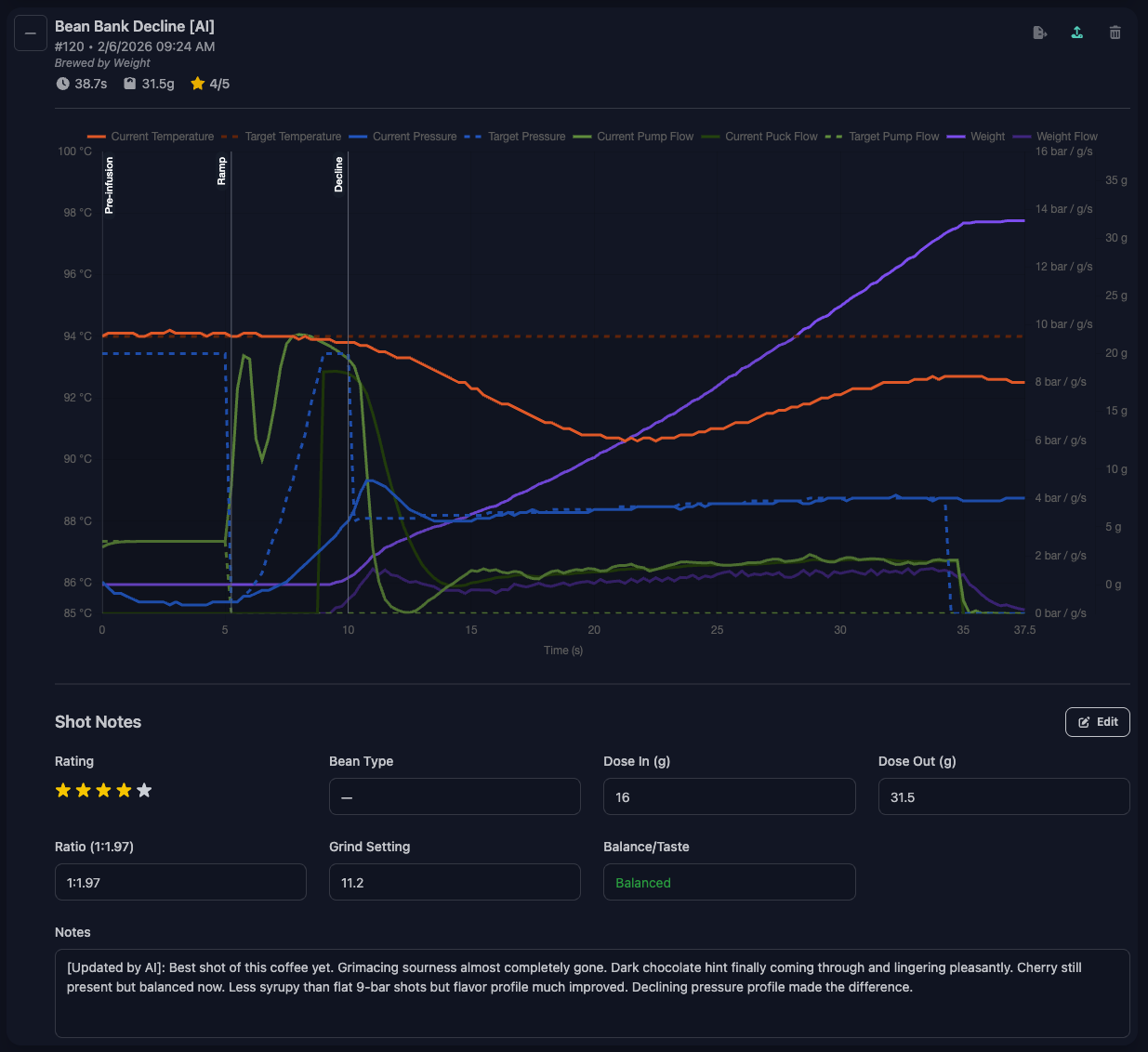
A shot profile showing the pressure decline phase, alongside shot notes tracking grind size, taste, and rating.
Welcome to the Mad Tea Party: Home Espresso
While you might think enjoying coffee is simply the process of putting dark powder into hot water and drinking it, it is my misfortune to inform you that it’s not—and there is no way you are “actually” enjoying coffee if you didn’t spend at least half your life’s savings on a portafilter machine.
Not to mention that the grinder is more important than the machine. Also, have you considered whether your coffee is washed, natural, or anaerobically processed? And is it roasted: medium, light, nordic? Don’t you dare brew a medium Brazilian with the same pressure and temperature as an Ethiopian Yirgacheffe light. How would you otherwise taste all the floral and strawberry notes?
If you think this is complex, please know that I spared you the puck preparation. I mean, do you even RDT, WDT? And to how much pressure is your tamper calibrated anyway?
“Alice, come, there’s an espresso machine with temperature, pressure, and flow control down this rabbit hole”
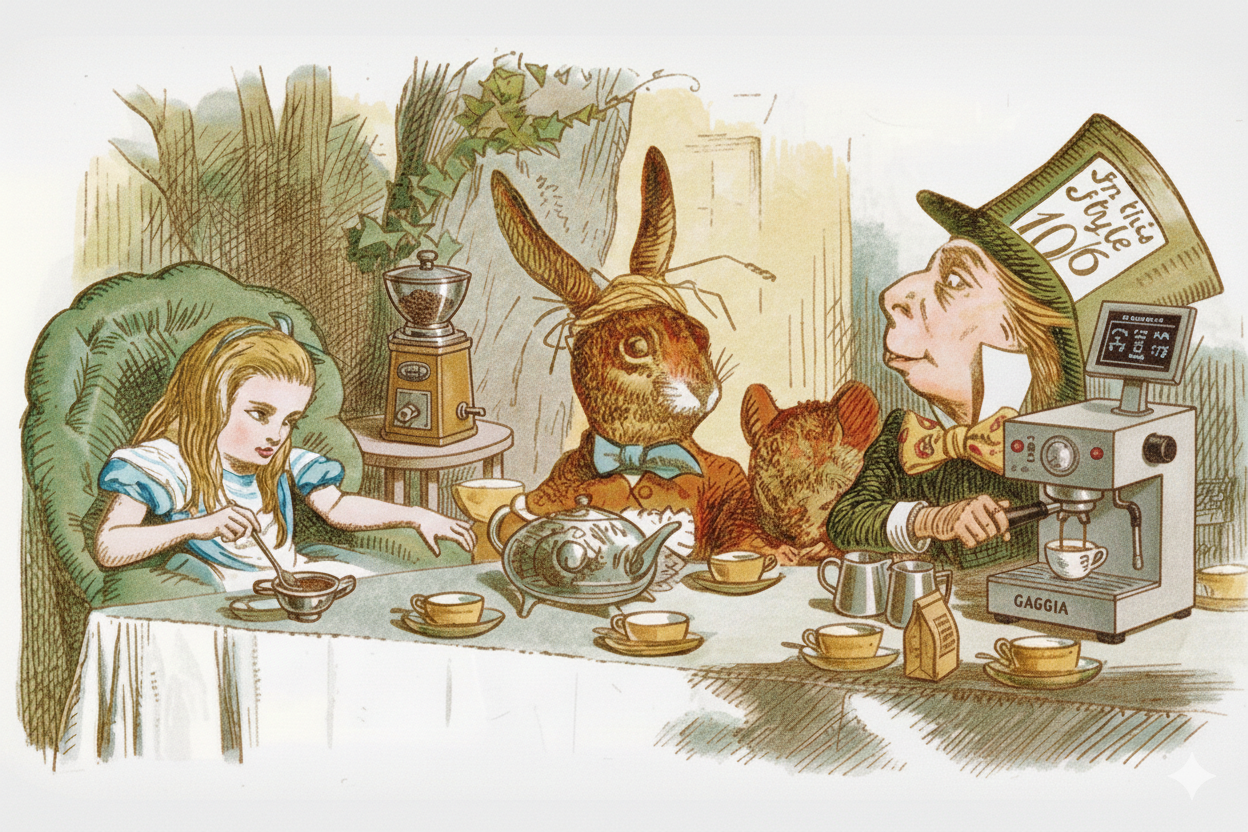
Welcome to the world of home espresso. (Image generated with Google Gemini)
Luckily for me, during the dark fall days, I modified my espresso machine with a pressure sensor, a PID temperature controller, and a microcontroller called Gaggimate, similar to an Arduino, which allows me to meticulously control each of these variables. Here’s Lance Hedrick’s video on the Gaggimate.
My Gaggimate allows me to create custom profiles where I specify parameters like:
- Pre-infusion — 6 seconds, flow target 2.5 ml/s, pressure cap 9 bar
- Ramp — 5 seconds max, pressure target 9 bar, ease-in over 4 seconds, exits early if pressure hits 8.5 bar
- Decline — 30 seconds max, pressure tapers from 9 → 4 bar over 20 seconds, stops at 36g out
Incidentally, this flexibility to control everything is also the reason why I now have to get out of bed at 4am if I want a coffee before work.
The White Knight Appears: LLMs can generate Gaggimate profiles
Luckily, the latest generation of LLMs is good at generating Gaggimate profiles once I explain how a profile is built and formatted, and how it works.
YouTube: Dule Rabbit shows how to use ChatGPT to generate profiles →
This works okay, but the downside is: I have to explain Gaggimate profiling to an LLM every other morning. And I told my parents I didn’t want to be a teacher when I grew up. Moreover, I have to copy-paste JSON profiles between Claude and my coffee machine.
The Solution: An MCP Server, a Skill, and a System Prompt
So, naturally, the only solution for me was to build an MCP server that connects Claude directly to my espresso machine. (I’m using Claude, but this approach works with any LLM that supports MCP. The principles are the same.)
“Mad?”
“I’m afraid so. Entirely bonkers. But I’ll tell you a secret. All the best ideas are.”
My inspiration was Brew by AI, by Matvey Kukuy, who built his own MCP integration that I iterated on.
Here’s what I built:
The MCP Server
The MCP server gives Claude five tools to interact with my espresso machine:
manage_profile— Create, update, and list brewing profiles directly on the Gaggimate. Claude can build profiles optimized for specific beans, adjusting temperature, pressure curves, pre-infusion timing, and flow targets.
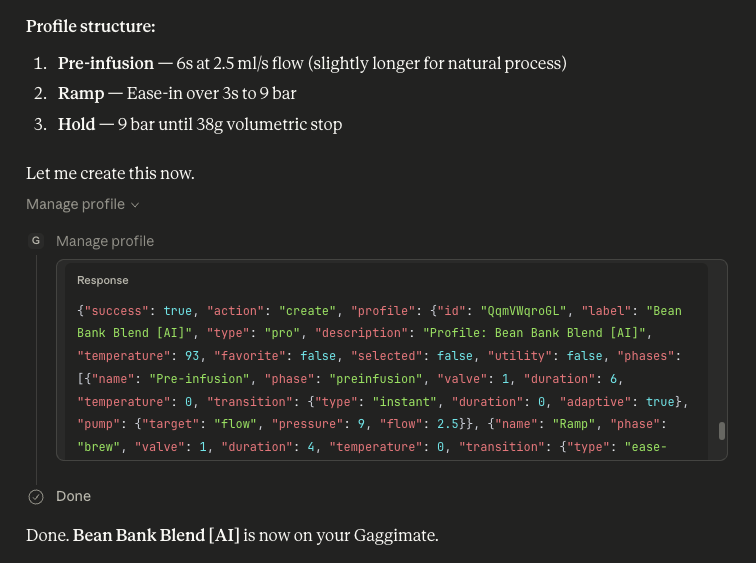
Claude calling the manage_profile tool to create a new brewing profile directly on the Gaggimate.
analyze_shot— Retrieve data from any shot. Gaggimate logs hundreds of data points per extraction—temperature curves, pressure readings, flow rates—but dumping raw time series into an LLM just creates noise. Instead, the server extracts key statistics per phase: average temperature, peak pressure, total flow, time to first drip. Claude gets the signal without drowning in data.manage_shot_notes— Record ratings (0-5 stars), tasting notes, and brewing parameters. I can track grind size, taste balance (bitter/balanced/sour), body, and specific flavors. This is the feedback loop that makes dialing in systematic.list_recent_shots— Browse shot history to find patterns. Claude can compare multiple shots and identify what changed between a 2-star disaster and a 4-star success.diagnose_connection— Troubleshoot connectivity issues. Useful when things aren’t working.
The Skill and System Prompt
The MCP server handles the how of talking to the machine. But Claude also needs to know what to do with that access—how Gaggimate profiles are structured, what parameters affect extraction, and how to interpret my feedback.
For this, I created:
- A System Prompt that defines the workflow: how to research new beans, create initial profiles, gather feedback, and iterate
- A Skill with the complete Gaggimate profile schema and examples
- Knowledge docs covering extraction theory, tasting vocabulary, and adjustment strategies—so Claude doesn’t go completely off-piste when dialing in a naturally processed Catuai Vermelho
Gaggimate also gives you the ability to rate your shots—e.g., “sour, tasted like battery acid, however, I did spend 10 minutes making it, therefore 2/5 stars.” What this allows me to do is track my different shots when dialing in a coffee, revisiting the settings I used and the extraction parameters to move one step closer to the perfect espresso.
The Result: A New Workflow
The result for me: a new workflow that makes dialing in new beans much simpler and allows me to ask Claude all the questions I have about whether natural or washed processing makes coffee easier to extract and how we should factor the altitude at which the coffee grew into the temperature we choose.
When I get a new bag of beans, here’s what I do:
- Take a picture of the bag and ask Claude to research the beans: origin, altitude, processing method, roast level, and tasting notes. I ask it to explain how this will affect the brewing process. For example, if it’s a light roast from a high altitude, Claude might suggest starting with a higher temperature to help extract more of the flavors.
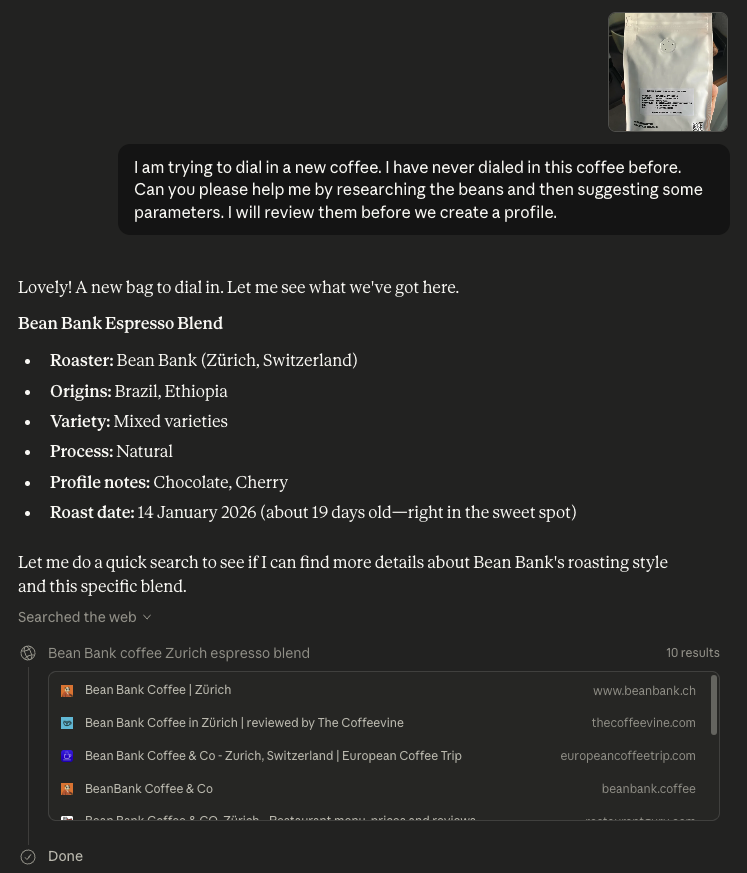
Claude researching a new bag of beans — identifying origin, processing method, and how they’ll affect extraction.
Claude creates an initial profile based on what it learned and the inputs or preferences I gave it. For example, when I switched from a washed Honduran (Santa Rosa) to a natural Brazilian (Amizade), Claude suggested lowering the temperature from 92°C to 90°C because natural process coffees have more soluble sugars that extract faster. It also recommended a gentler pre-infusion flow because naturals have more chaff and fines that can cause channeling.
Pull a shot and give feedback — Was it Balanced Sour/Bitter? Did I taste chocolate or dried fruit? What was the body like? Do I want it more syrupy next time?
Claude analyzes and adjusts — Based on my feedback and the shot data (pressure curves, flow rate, extraction time), Claude suggests tweaks to the profile.
Repeat until dialed in — The new workflow allows me to be more systematic in tracking my variables and feedback. This makes it easier to factor in the different parameters, understand their impact, and easily track my feedback instead of relying on memory.
The shot notes MCP method is the key here. I tell Claude what I tasted and how I felt about it. It logs the information, compares it with the parameters of the shot, and then suggests adjustments.
My espresso journey went from stochastic chaos to something that actually converges.
Safety Guardrails: Avoiding the AI Apocalypse
Now AI controls my coffee machine. How can we avoid the AI apocalypse? Let’s talk about guardrails.
First, the important one: Claude cannot start or stop shots, and it cannot turn on the machine. I’m still the one pressing the button. The machine has a boiler that can get pretty hot; I want to be in control.
Beyond that, I’ve built in some sensible limits:
- Temperature is programmatically capped — You rarely need more than 96°C for espresso. Going higher risks over-extraction and burnt flavors. If AI tells you otherwise, consider switching models.
- AI-created profiles are tagged with
[AI]and only[AI]profiles can be modified — So I always know what’s mine versus what Claude made. Claude can only delete profiles it created. - Local backups — Every profile version is saved locally as JSON.
Reflection and Further Research
Is Claude actually helping me extract the BEST possible coffee? I am not a trained barista, so it’s difficult to judge. However, my experience has improved, and it is for sure making me a better barista.
For me personally: the real value isn’t automation—it’s learning acceleration. When Claude generated that comparison table between my Honduran and Brazilian beans, explaining why naturals need lower temperatures and gentler pre-infusion, I learned more about extraction theory in a few minutes than I had in months of trial-and-error. The AI researches things I wouldn’t have considered, suggests approaches I can challenge and experiment with, and keeps detailed records of what worked. It’s not “AI makes coffee for me”—it’s “AI helps me understand coffee better.”
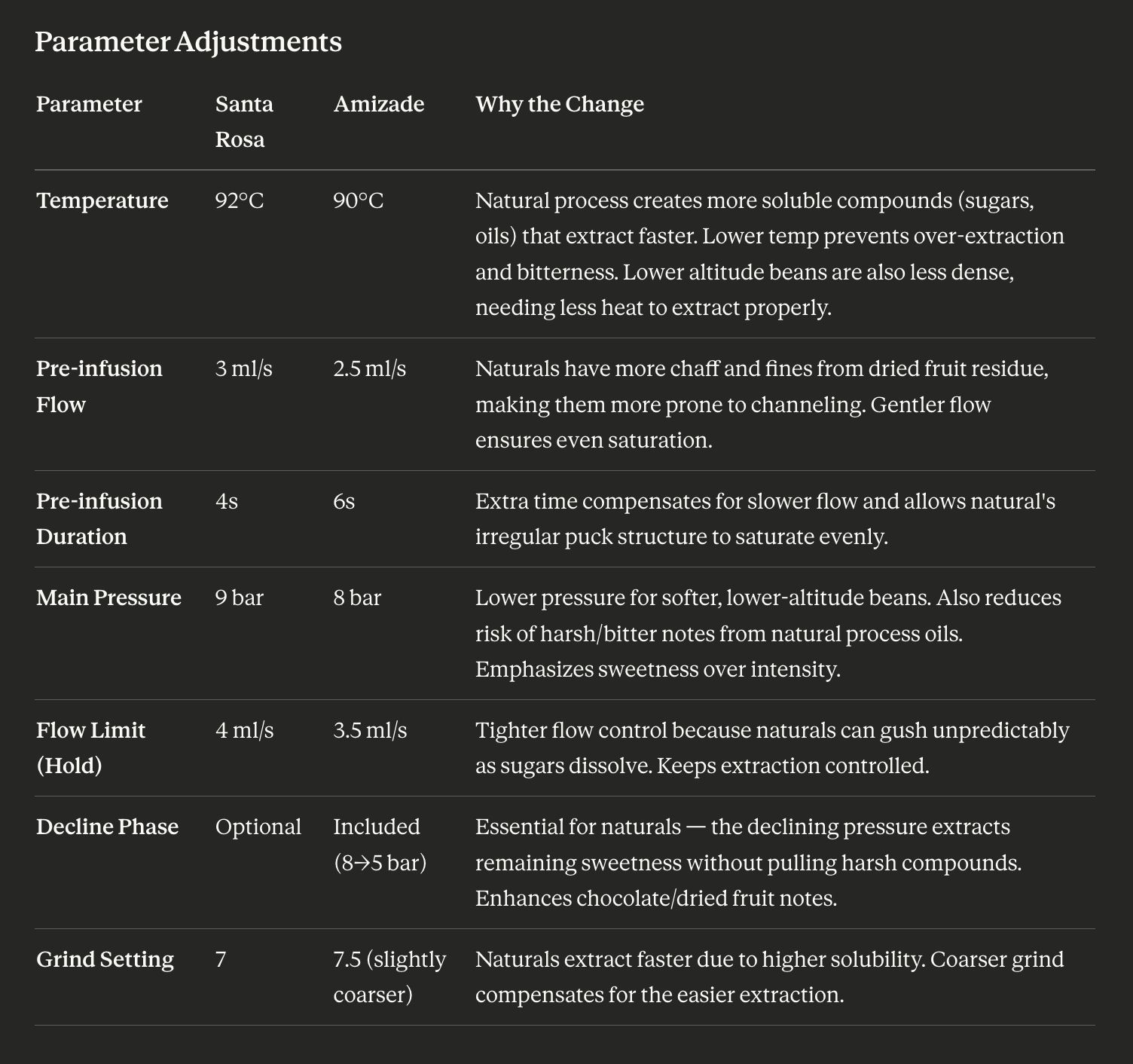
Claude reasoning over brewing parameters — comparing a washed Honduran and a natural Brazilian to explain why each needs different treatment.
I initially started building my own agent to achieve this workflow. But I quickly realized: why maintain a custom agent when I can just use the most powerful agent out there? By connecting the MCP server to Claude Desktop, I get memory across conversations, the ability to reference older chats, and web search for researching new beans. I don’t need to implement my own safety guardrails for the LLM. I can manage the MCP server, i.e., the espresso-specific parts; Claude handles being a good AI assistant.
An open question I’m still thinking about:
- What knowledge should I add to make the AI barista better? I need to ask a subject matter expert and find a way to keep the knowledge up to date.
Next Steps & Improvements
As a next step, I’m interested in connecting a smart grinder to the setup. Something like the Bookoo Motto 80 might eventually offer this, though no details on API access are available yet. This would allow me to automatically log the grind size and weight of the coffee I use for each shot, giving me even more data to optimize my brewing process.
Finally, at a later stage, I could use High-Performance Liquid Chromatography and TDS (Total Dissolved Solids) measurements to encode my taste profile in a vector, so that we can finally numerically optimize the perfect cup and don’t need to drink so much coffee anymore.
Try It Yourself
My GitHub repo contains installation instructions, code for the MCP server, and the system prompt and skill I use to connect Claude to my espresso machine. Check it out here: github.com/julianleopold/gaggimate-mcp